ComfyUI Auto Tagger
Advanced metadata extractor for AI images. Supports ComfyUI, A1111, and Civitai. Effortlessly organizes prompts and model info into searchable Eagle tags and notes.
ComfyUI Auto Tagger for Eagle
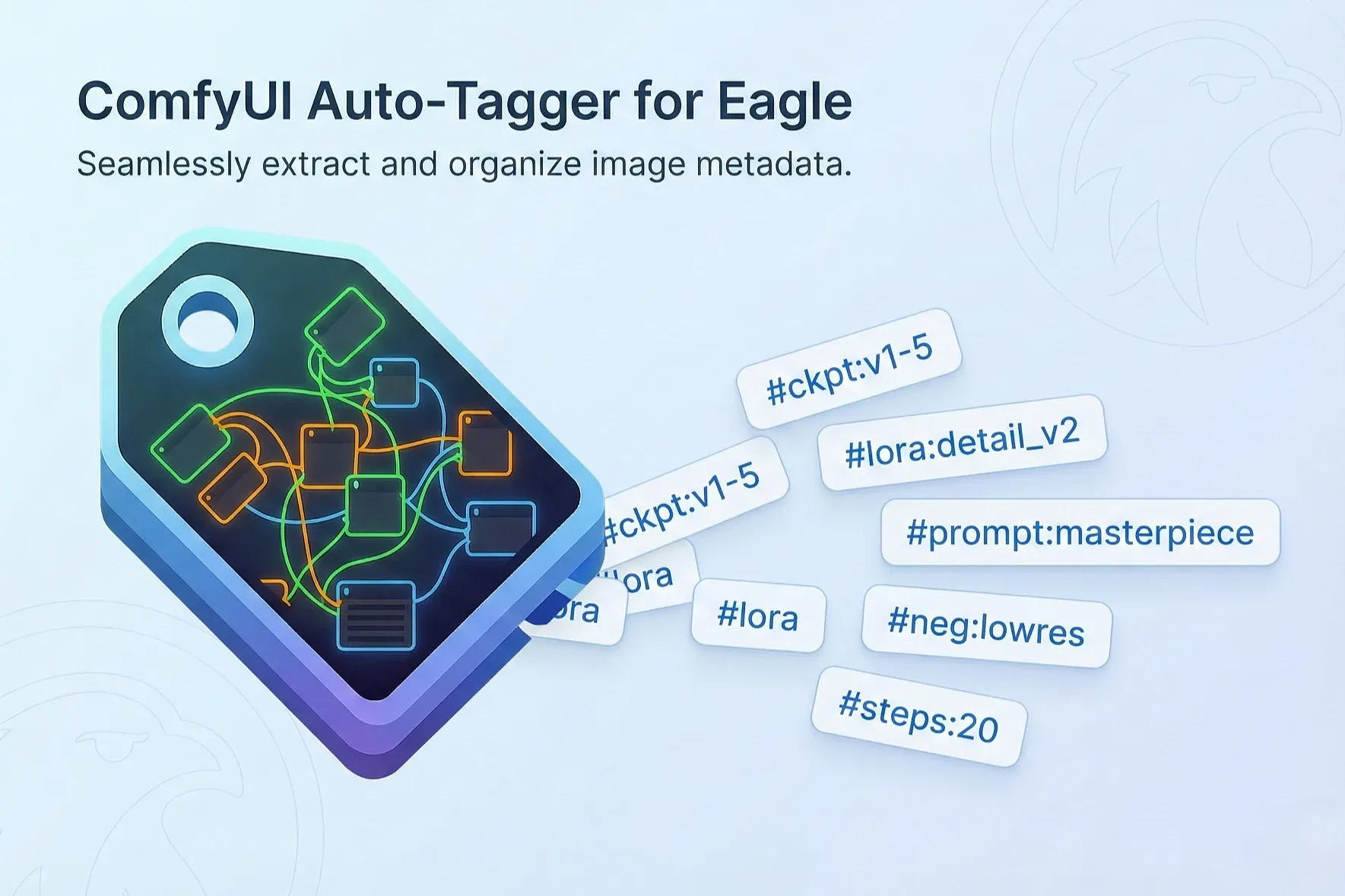
ComfyUI Auto Tagger is a plugin for Eagle that automatically extracts metadata from AI-generated images. It provides two main features:
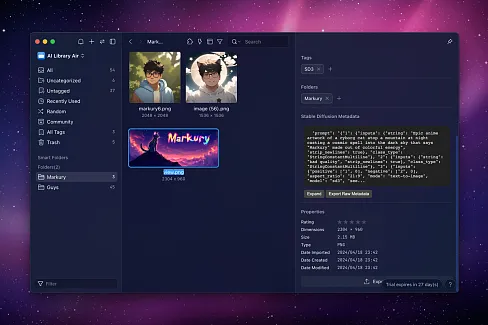
- Generation Info Inspector — Instantly view prompts, seeds, and generation parameters when you select an image (with copy buttons for quick reuse)
- Auto-Tagging — Save extracted metadata as Tags and Notes for organization and filtering
It supports ComfyUI, Stable Diffusion WebUI (including Automatic1111, Forge, and other variants; referred to as "A1111" below), and Civitai generated images in PNG, WebP, and JPEG formats, and allows you to filter which information to import.
[Features]
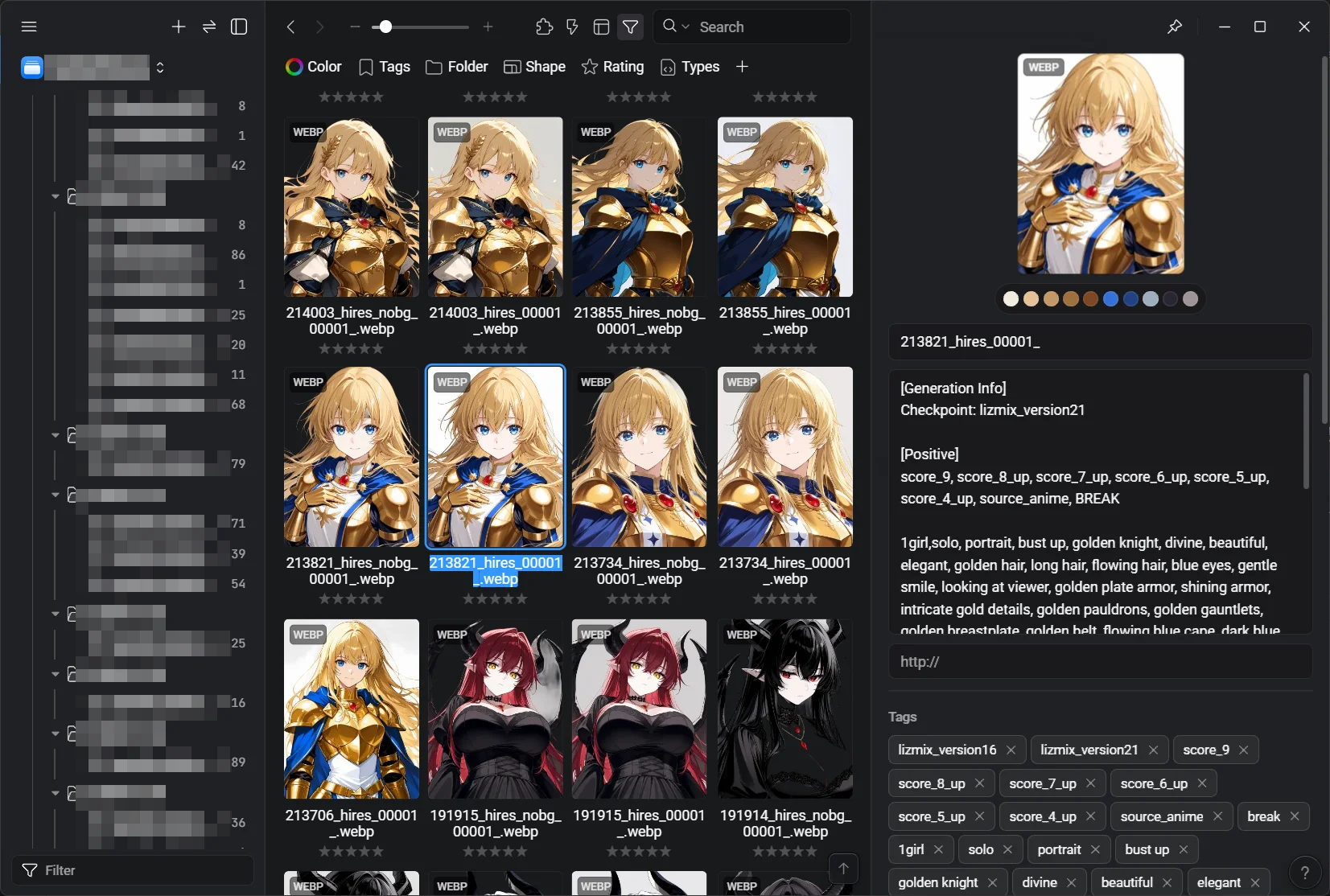
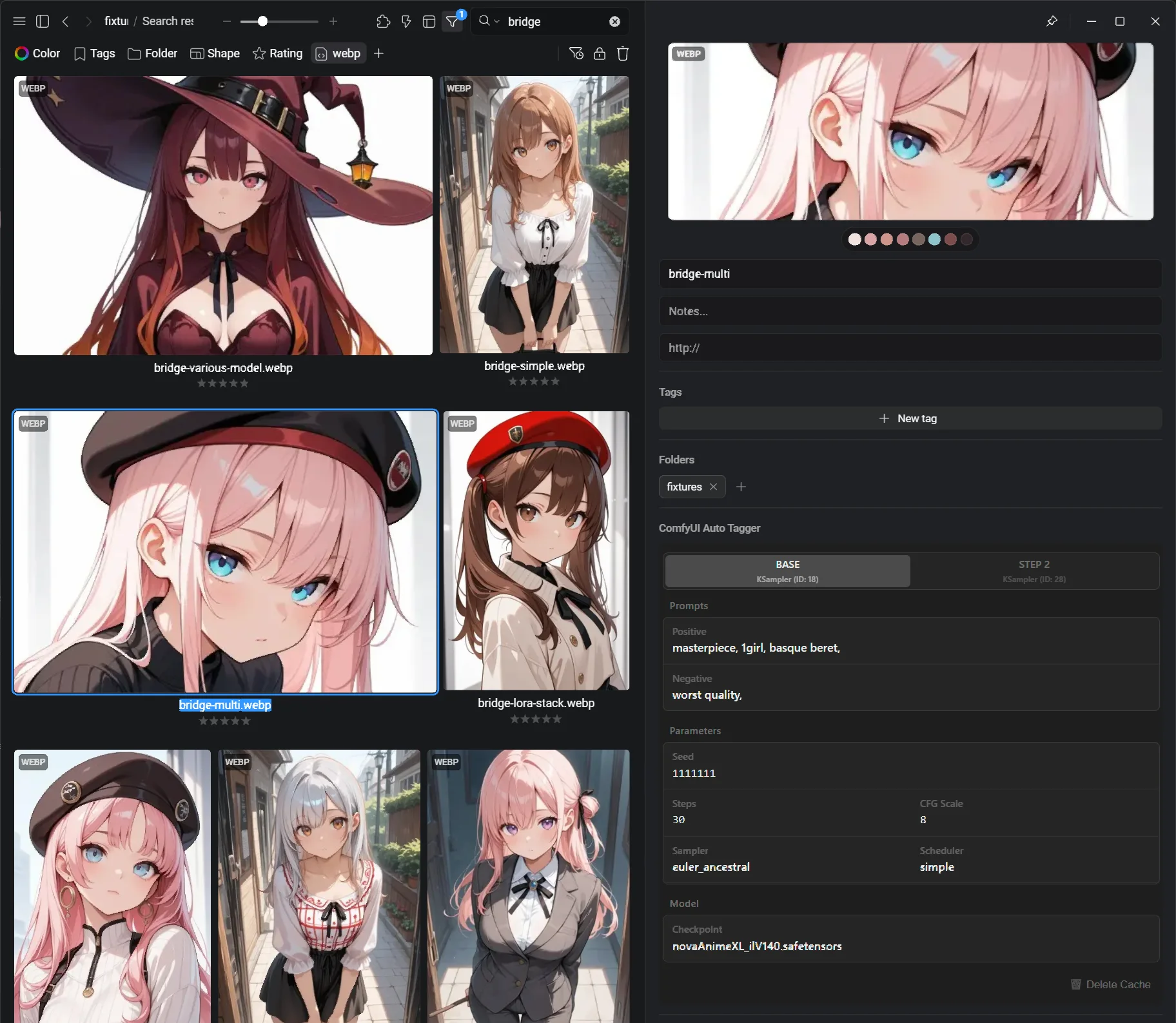
Generation Info Inspector: When you select an image in Eagle, a panel automatically appears showing the generation metadata — prompts, seed, sampler, model, and LoRA — with a copy button for each field. Multi-sampler workflows display as tabs (Base / Step 2, etc.).
- Multi-Format Support: Supports ComfyUI workflows (including complex multi-sampler), A1111 (Stable Diffusion WebUI) parameters, and Civitai generation metadata.
- Metadata Extraction: Automatically extracts the models used (Checkpoints, LoRA), prompts, and generation settings (Seed, Sampler, Steps, CFG).
- Flexible Output:
- Tags: Adds extracted info to Eagle tags (e.g.,
#checkpoint_name,#lora_name,seed:12345). - Notes (Annotation): Saves full prompts and parameters in the Note section for easy reference.
- Tags: Adds extracted info to Eagle tags (e.g.,
- Selective Import: Allows toggling specific items (e.g., "Import Checkpoint but ignore Seed") via checkboxes.
- Batch Processing: Efficiently processes multiple images with a progress bar.
- Advanced Workflow Analysis: Dynamically analyzes ComfyUI workflows to trace the actual execution path. Accurately extracts parameters even from complex workflows with multiple generation stages (HiresFix, FaceDetailer, etc.).
- Suspicious Node Detection: Detects nodes with missing required inputs in ComfyUI workflows and allows users to decide whether to include or exclude them from metadata extraction.
- Force Delete Mode: Removes all tags and notes from selected items without analysis (Shift + Click on "Delete Info").
- Debug Mode: Detailed logs for troubleshooting (toggle via checkbox).
- No External Dependencies: No additional libraries required — works out of the box after installation.
- Utility: Provides a dedicated button to safely remove only the tags/notes added by this plugin.
[Ultimate Automation: Eagle Metadata Bridge]
Eagle Metadata Bridge is a ComfyUI custom node that replaces the standard Save Image node. Every time you generate an image, it automatically:
- Sends the image to Eagle
- Attaches tags (checkpoint, LoRA, prompt tokens, seed, sampler…) and a structured annotation
When used alongside this plugin, tag management becomes even more powerful — images arrive in Eagle already tagged, and you can re-run this plugin at any time to update, filter, or batch-process them further. The node embeds an identifier into each saved image, allowing this plugin to reliably retrieve the prompt and generation parameters by tracing the exact workflow graph instead of relying on heuristics or inference.
[Generation Info Inspector]
Select any AI-generated image in Eagle and the inspector panel appears automatically, showing prompts, parameters, and model info — each with a copy button. Multi-sampler workflows are split into tabs.
[Advanced Workflow Trace Logic]
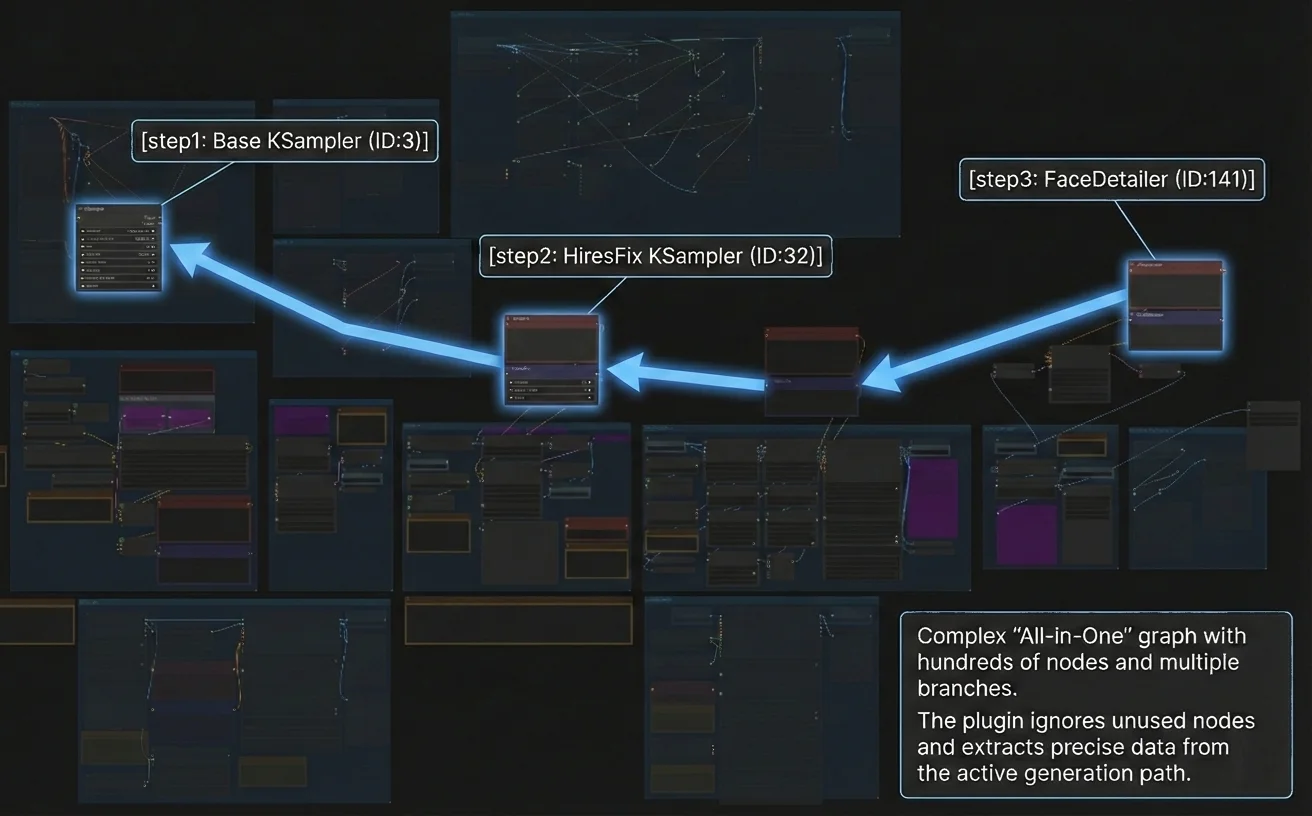
The plugin traces complex ComfyUI workflows to identify the actual generation pipeline, supporting multi-stage setups with multiple samplers and refinement stages (HiresFix, FaceDetailer, etc.).
Path-Based Extraction: It traces the execution path from the output nodes back to the source. This ensures that in "All-in-One" workflows, only the parameters that actually contributed to the image are recorded.
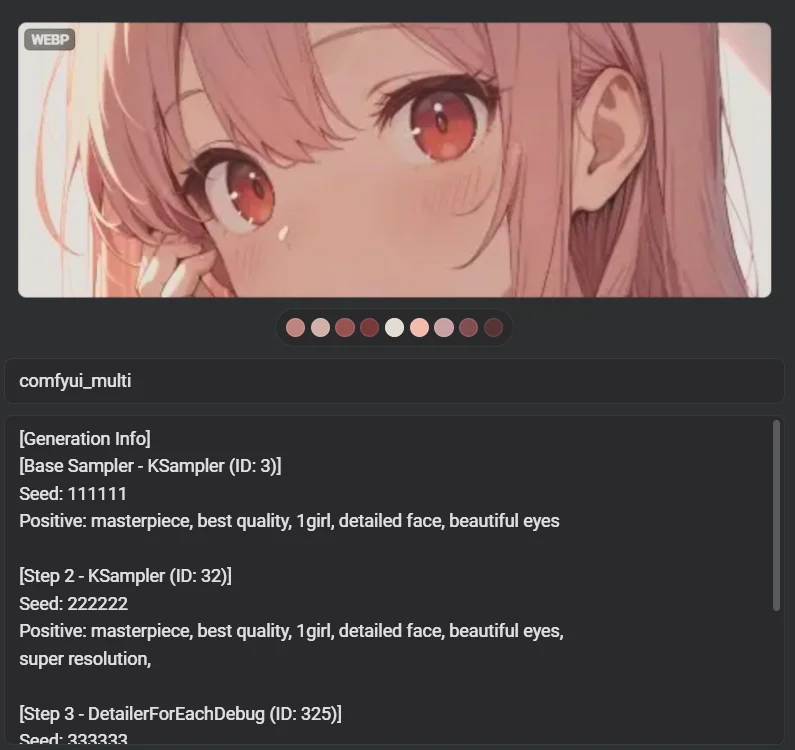
Multi-Stage Support: Captures data from every generation step, including KSamplers, FaceDetailers, and HiresFix, providing a complete "recipe" for reproduction.
Accurate Parameter Retrieval: Even with complex custom nodes like "Lora Loader Stack" or Reroute/Primitive nodes, the logic recursively resolves values to ensure accurate retrieval.
Full Audit in Notes: Every detected generation step is recorded in detail within the Eagle Notes section, providing a precise "recipe" for reproduction.
[Heuristic Node Detection]
ComfyUI metadata doesn't record the actual execution path. The plugin traces back from the final image save node to extract prompts and parameters. In this process, nodes that weren't actually used may be included.
For example, a workflow designed for txt2img (text-to-image) might contain img2img (image-to-image) nodes. If you used only txt2img, those img2img nodes were never executed — but the plugin cannot detect this automatically. When suspicious nodes are detected, the plugin displays a dialog, allowing you to decide whether to include or exclude them from metadata extraction.
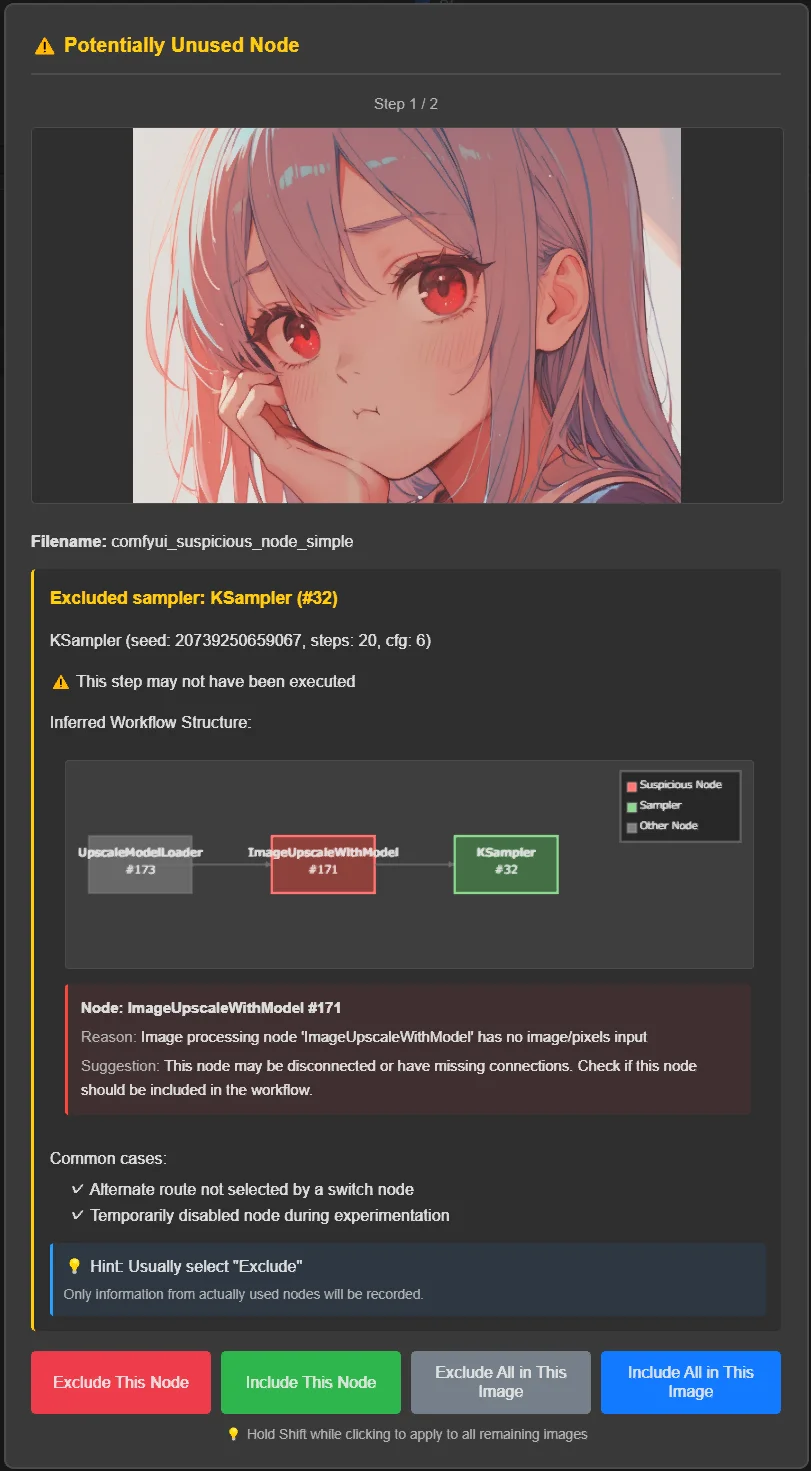
You can configure how to handle suspicious nodes in the settings (see Configuration section below).
[Settings]
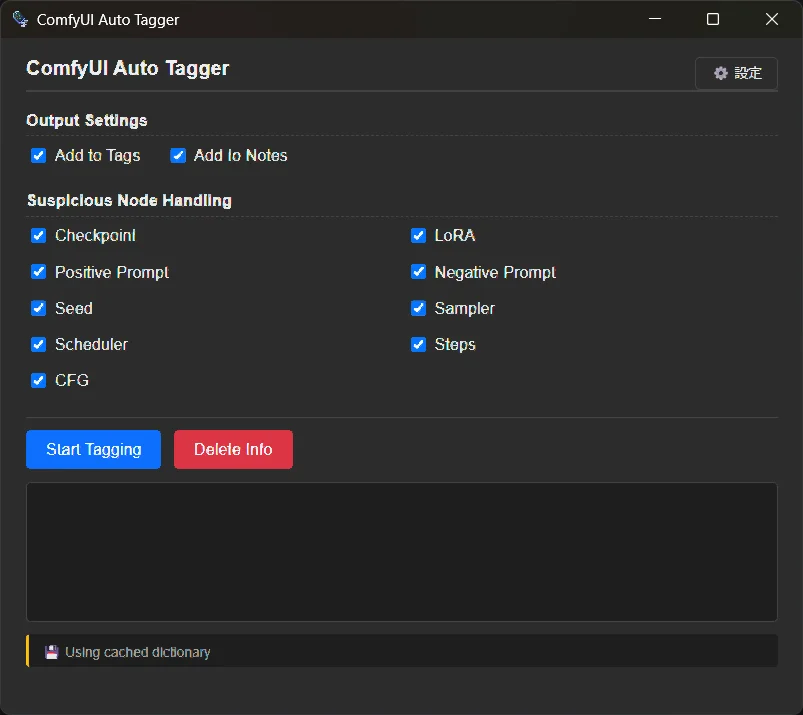
You have full control over how your library is organized:
Extraction Targets: Selectively import Checkpoints, LoRAs, Prompts, Seeds, Steps, CFG, etc.
Output Destination: Toggle Tags and Notes independently to match your workflow.
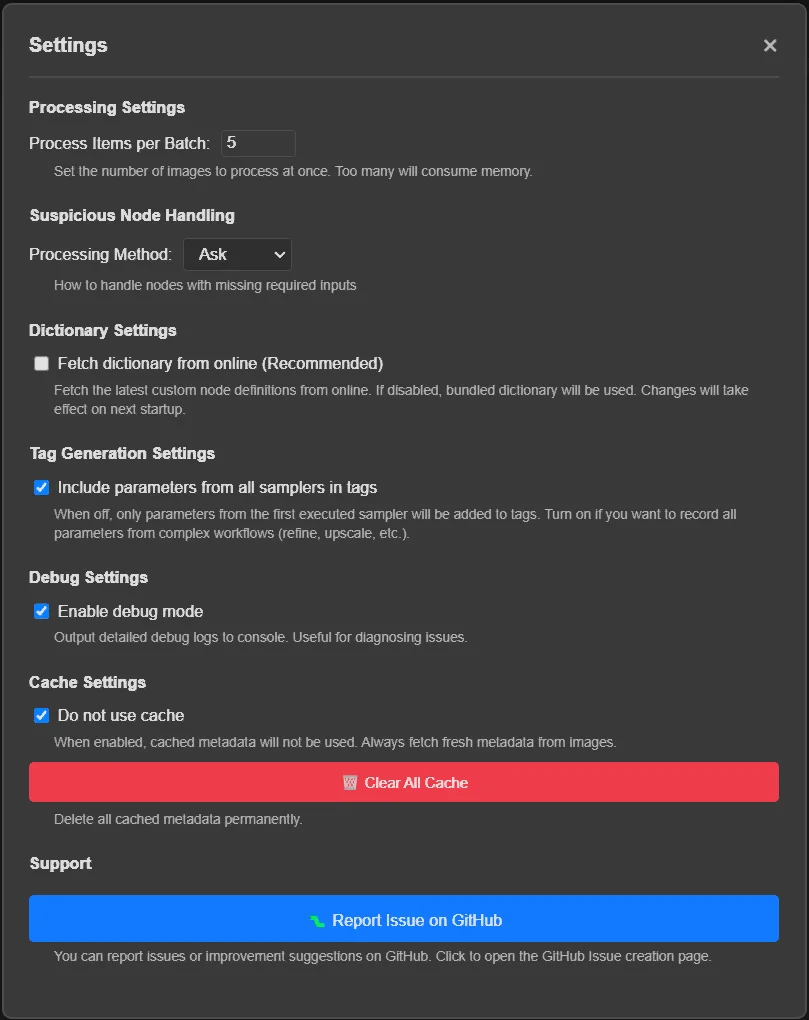
Processing Settings
- Process Items per Batch: Set the number of images to process at once (default: 5). Processing too many images simultaneously may consume excessive memory.
Suspicious Node Handling
- Suspicious Node Handling: Configure how to handle suspicious nodes (nodes with missing required inputs):
- Exclude: Automatically exclude suspicious nodes from metadata extraction
- Ask: Show a dialog for each suspicious node (recommended)
- Include: Include all nodes regardless of missing inputs
Dictionary Settings
- Fetch dictionary from online (Recommended): Fetches the latest custom node definitions from GitHub. If disabled, the bundled dictionary will be used. Changes take effect on next startup.
Tag Generation Settings
- Include parameters from all samplers in tags: When enabled, parameters from all samplers in the workflow are added to tags. When disabled (default), only parameters from the first executed sampler are added. Enable this if you want to record all parameters from complex workflows with multiple refinement stages (HiresFix, upscale, etc.).
Debug Settings
- Enable debug mode: Outputs detailed debug logs to console. Useful for diagnosing issues or reporting bugs.
Cache Settings
- Do not use cache: When enabled, the plugin will not cache metadata for images. This is useful for testing or when you want to ensure fresh metadata is always extracted. Changes take effect immediately.
- Clear All Cache: Permanently deletes all cached metadata files. This frees up disk space and allows you to start fresh.
- Delete Cache (Inspector): When viewing an image in the Inspector panel, a delete button (🗑️) appears at the bottom. Click it to delete the cached metadata for that specific image.
Cache files are stored in
{Library Path}/.eagle/plugins/comfyui-auto-tagger/metadata-cache/and are automatically used to speed up repeated metadata viewing.
[How to Use]
Select one or more AI images in Eagle.
Right-click and choose Plugins > ComfyUI Auto Tagger.
Configure your settings (First-time setup recommended).
Click Start Tagging.
🎉 New Features
- Step-centric suspicious node dialog: When a workflow contains suspicious nodes (ask mode), the prompt now shows the affected sampler step (seed / steps / cfg / sampler) with a list of warning cards explaining why it may not have been executed, instead of asking about each disconnected node one by one.
- Excluded sampler tab in inspector: Samplers that were excluded from generation (because of suspicious upstream nodes) are now displayed as separate tabs with full parameter info and warning context.
✨ Improvements
- Inspector categorization extracted: SuspiciousNodeCategorizer is now a standalone module with its own unit tests, making it reusable across inspector and dialog.
- Parser self-parsing: ComfyUIParser now accepts both pre-parsed objects and raw JSON strings for workflow / prompt / eagle_bridge. ImageMetadataReader returns raw text for all formats (PNG/WebP/JPEG), eliminating premature JSON parsing.
- A1111 parse noise removed: parseJsonSafely no longer logs errors when a non-JSON field (e.g. A1111 parameters) falls back to the default value.
- Comprehensive test coverage: Added 142 new test cases covering MetadataCacheService, excludeBaseSamplersMetadata logic, plugin initialization, and cache flow integration (1371 total tests, all passing).
🐛 Bug Fixes
- Orphan suspicious nodes no longer leak into unrelated warnings: A node with no affectedSteps and no stepMetadata is treated as orphan and excluded from sampler tabs / dialog steps (regression guard for the #395 mix-up).
🎉 New Features
- Generation Info Inspector: Selecting an image in Eagle now opens a side panel that displays prompts, seed, sampler parameters, checkpoint, and LoRAs — each with a copy button. Multi-sampler workflows are shown as tabs (Base / Step 2, …).
✨ Improvements
- Per-step checkpoint tags: When a workflow uses different models for different sampler steps, each model is now tagged independently. Tags are collected from each step's connected checkpoint loader instead of a single global value.
- Annotation always shows Checkpoint per step: The Checkpoint: line now appears inside every sampler step block regardless of whether the model is the same across steps, making the output consistent and unambiguous.
- Expanded E2E test coverage to include all 35 bridge fixtures (PNG/WebP/JPEG all formats).
- Added comprehensive MIME type unit tests for format detection edge cases.
- Improved i18n test detection and validation logic.
🐛 Bug Fixes
- JPEG support: Fixed metadata extraction failure for JPEG images by adding proper MIME type mapping (.jpg/.jpeg → image/jpeg).
- UI hardcoding: Removed hardcoded English labels from index.html checkboxes to ensure proper i18n support. All labels are now set via JavaScript translation function.
- XSS vulnerability: Fixed DOM-based XSS vulnerability in inspector.html by replacing unsafe innerHTML with textContent and safe DOM construction.
🎉 New: Suspicious Node Detection: Implemented a heuristic detection system to identify nodes with missing required inputs in ComfyUI workflows.
Adds configurable handling modes: Exclude (default), Include, or Ask via a dialog.
The dialog displays affected generation steps, and Shift+Click allows applying the decision to all remaining images.
✨ Improvements:
Enhanced workflow validation to detect non-executable nodes before processing.
Improved base sampler detection for workflows using DetailerForEach nodes.
Better handling of complex multi-stage refinement workflows.
🐛 Bug Fixes:
Fixed distance calculation for samplers that process images instead of latents.
Minor UI and stability improvements.
🎉 New Features
A1111 & Forge Support: Official support for Stable Diffusion WebUI (A1111/Forge) generated images. Extracts prompts, seeds, and models from both PNG and WebP formats.
Civitai Integration: Full support for images generated directly on the Civitai platform.
Force Delete Mode: Quickly remove all tags/notes from selected items without analysis by holding Shift + Clicking the "Delete Info" button.
✨ Improvements
Advanced Workflow Tracing (ComfyUI): Enhanced logic for complex img2img and multi-stage workflows (HiresFix, FaceDetailer). It now accurately identifies the primary generation parameters by tracing VAEEncode chains.
Expanded LoRA Detection: Improved support for various LoRA loaders, including "Lora Loader Stack (rgthree)" and standard A1111 LoRA hashes.
Cleaner Annotations: Refined the Note (Annotation) format to skip empty labels or unnecessary headers when specific metadata is missing.
🔧 Internal
Robust Engine: Completely refactored metadata parser architecture for faster and more reliable extraction.
Stability: Added a comprehensive test suite with 200+ tests to ensure stable performance across different generation environments.
Major update with improved accuracy and new features.
New: Added support for writing metadata to the Notes section.
New: Added a Settings UI to filter which metadata to import (e.g., ignore Seed, keep LoRA).
Improved: Enhanced parsing logic to support complex workflows (Reroute/Primitive nodes) and API-format prompts.
Improved: Implemented batch processing with a progress bar for better performance.
Fixed: Added full support for WebP files.
Fixed: Resolved issues with dark mode and multilingual display.
You may also like